Opens in a new tab
Amazon WorkSpaces management, automation and cost control

Cut your WorkSpaces bill.
Clear your support queue.
All from one console.

Stop paying for idle and oversized desktops.
Stop escalating simple tickets.
Stop building WorkSpaces by hand.

WorkSpaces Manager gives your team one console for Amazon WorkSpaces and WorkSpaces Applications across every account and region, so you can reduce administration, automate routine tasks and cut unnecessary spend.

Available on AWS Marketplace · Deployed in your AWS environment · 24×7 support

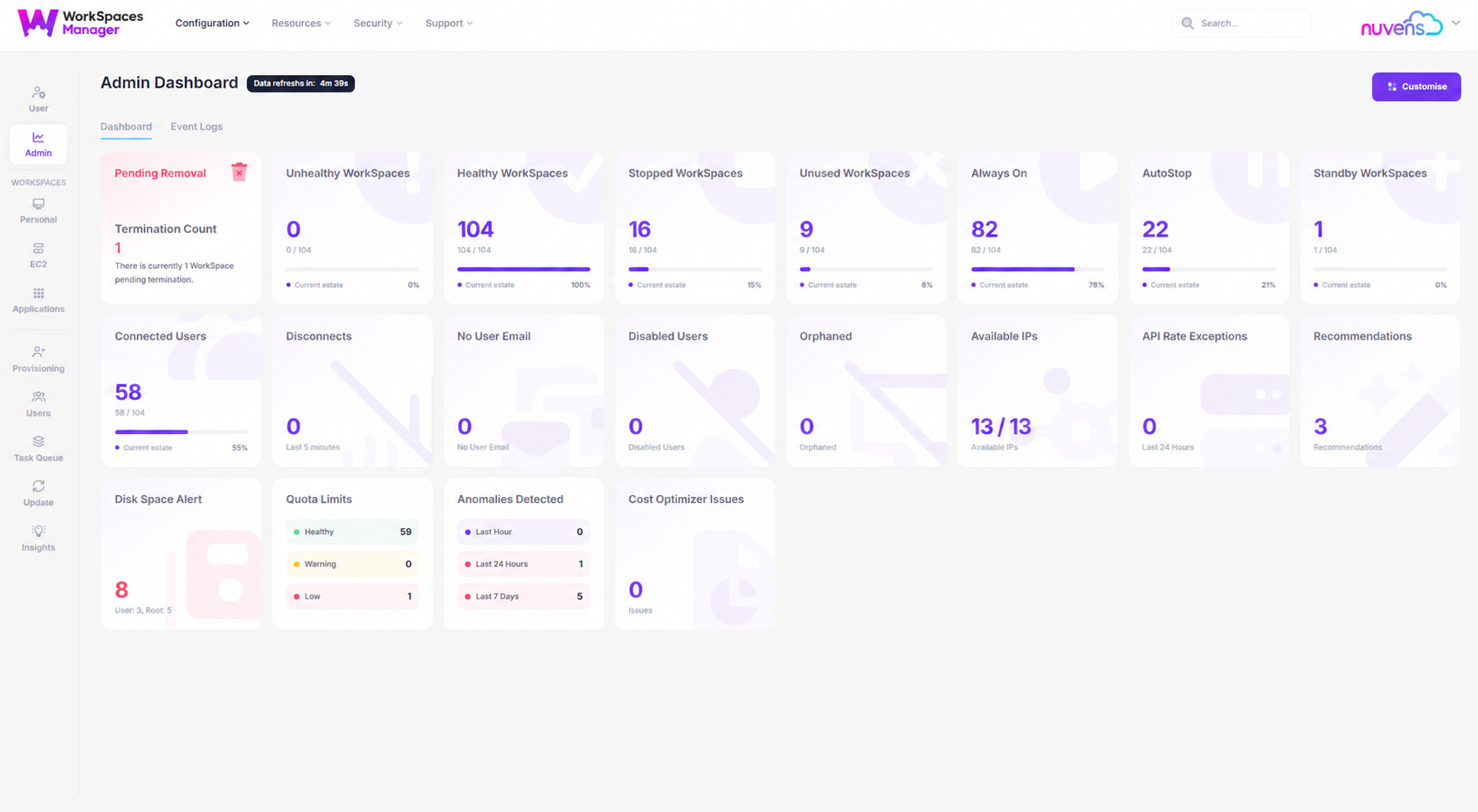
WorkSpaces Manager administration dashboard
ONE VIEWMulti Account
Multi Domain
FROM INSIGHT TO ACTIONIn one secure console
The problems we solve

WorkSpaces are easy to deploy.
Running at scale is not.

Once an estate grows, accurate visability becomes more complicated, support tickets need AWS experts, and the bill climbs because of desktops nobody uses. WorkSpaces Manager tackles all three.

01 / Provision
“New starters wait days for a desktop.”

A ready-to-work WorkSpace in minutes, with no tickets.

Add a user to an AD or Entra ID security group. WSM builds the WorkSpace, applies your baseline, checks readiness and emails the user. Need 500 for a new team? Do it in one run.

Thousands in a single run. Zero manual steps.
02 / Support
“Every ticket ends up with the one person who knows AWS.”

Your service desk fixes it first time.

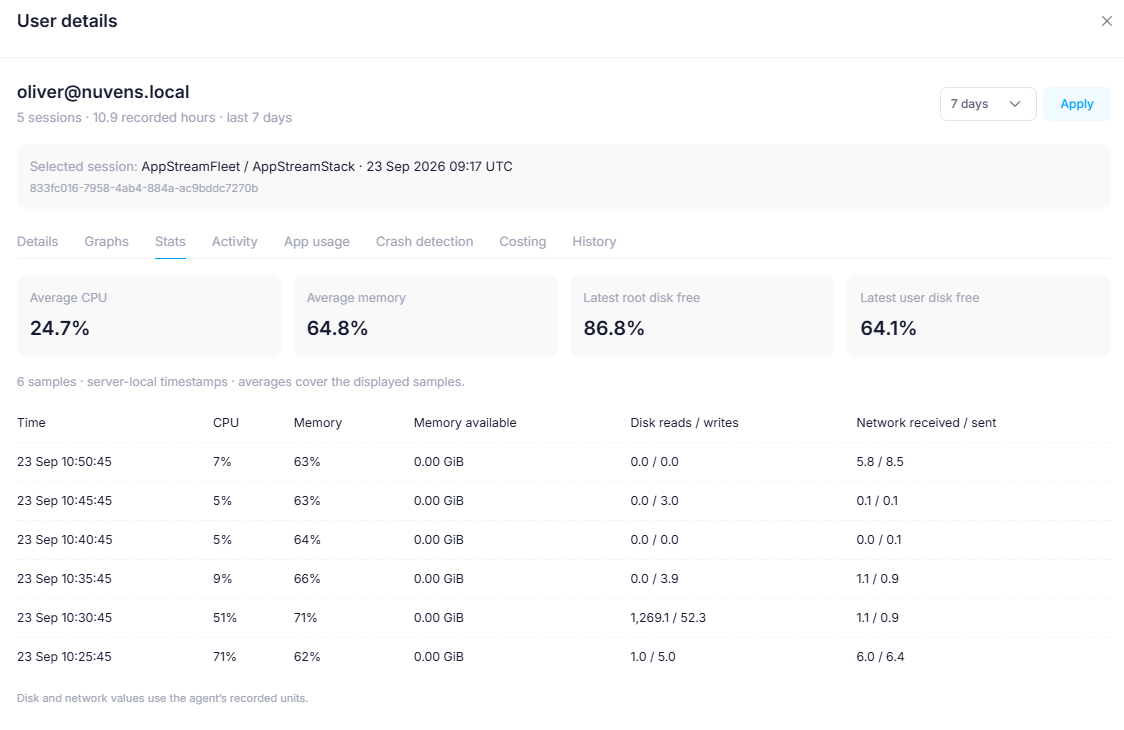
Find any user across every account. See latency, CPU and memory history, then reboot, rebuild or shadow a session. Role-based access gives first-line staff control without AWS Console access.

Fewer escalations. Faster fixes.
03 / Optimise
“The WorkSpaces bill keeps going up.”

Pay only for the WorkSpaces people use.

Find unused, orphaned and oversized WorkSpaces. Move each to the cheaper billing mode each month and downgrade or remove desktops automatically under your rules.

Savings from month one, with cost history to prove it.
31 capabilities across four areas

Built for the jobs that eat your team’s week.

More than 300 features have been added from customer requests since 2018. Explore the management, administration, optimisation and automation tools below.

01 / Management

See problems before users report them.

Stop finding out about problems from angry users.

Performance Monitoring
Fix slow desktops before the ticket arrives.

WSM alerts you when a user keeps hitting CPU or memory limits, so you can resize the WorkSpace before they complain.

In-session Latency
“My WorkSpace is slow”, answered in seconds.

See 12 hours of latency for any user and tell straight away whether it's their network or the desktop.

User Usage
Know who actually uses their WorkSpace.

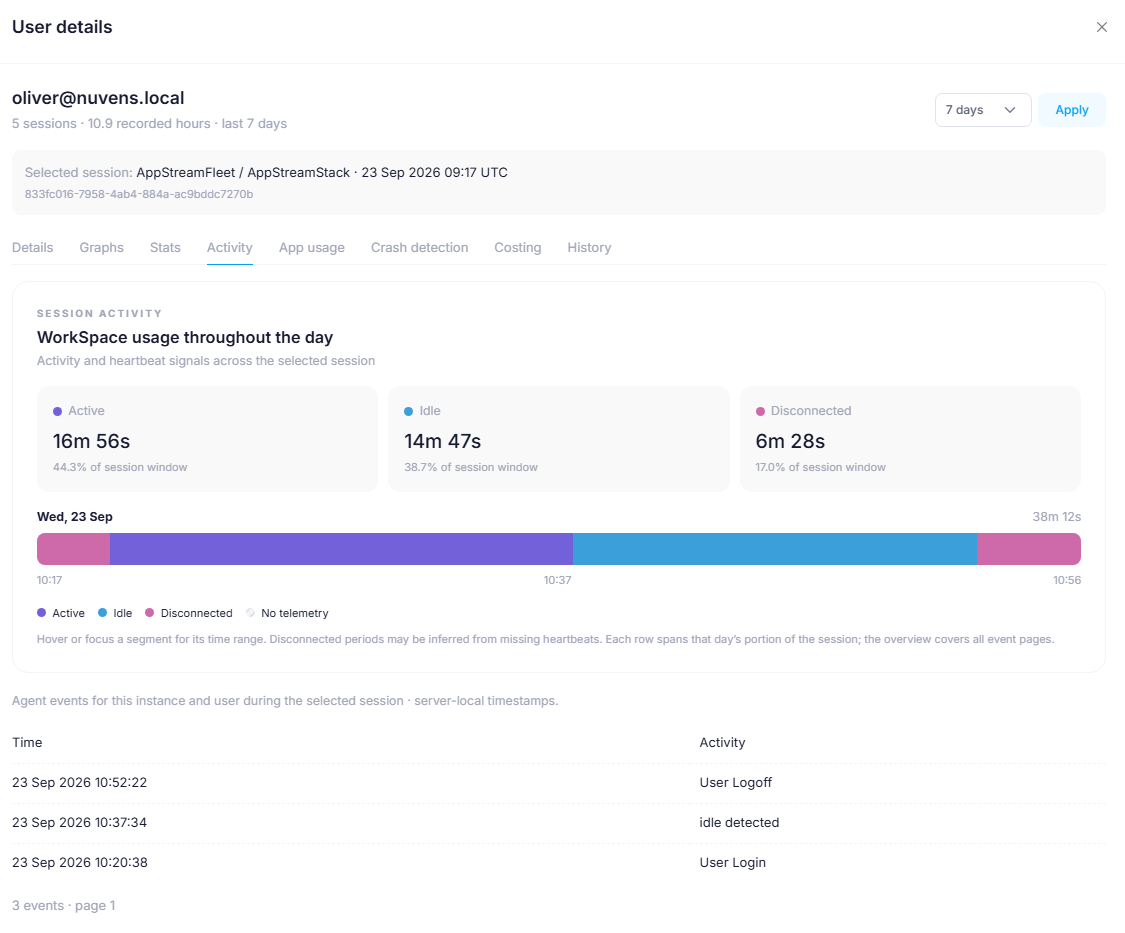
Logon, logoff and idle time for every user, the evidence you need to right-size, recharge and remove WorkSpaces with confidence.

Application Reporting
Know what's running on every desktop.

See installed applications and their CPU and memory use across the estate, for licence audits, security reviews and troubleshooting.

User Location
Spot the logon that shouldn't be there.

See where in the world each user connects from, so you can flag unusual access and support compliance checks.

Client Version
Find out-of-date clients before they cause tickets.

See which WorkSpaces client each user runs and report on everyone who needs to upgrade.

Available IP Alert
Never lose a deployment to IP exhaustion.

Get warned before a directory runs out of IP addresses, before a rebuild or expansion fails in front of the business.

WorkSpaces Pools Billing
Charge Pools costs back, user by user.

Split shared WorkSpaces Pools costs by each user's actual time, so every department pays for what it uses.

Reports
Answers in one click, action in the next.

Last reboot, unused WorkSpaces, patch status and more. Select the results and reboot, delete or change running mode in bulk.

02 / Admin tools

One secure console for the whole team.

Give your service desk power without giving away the AWS Console.

Granular Access Roles
Stop handing out AWS Console access.

Choose from more than 15 roles, scoped by region, directory or tag. First-line staff get exactly what they need and nothing more, which cuts both escalations and risk.

Centralised Multi-Account Management
Every account, region and domain in one place.

Manage WorkSpaces across multiple AWS accounts, regions, domains and forests without switching consoles or logins.

Easy Search
Find any WorkSpace in seconds.

Search by name, email, WorkSpace ID, IP address, OS, directory, bundle or tag, including partial matches. It's the fastest route from phone call to fix.

Quick Control
From search to screen share in one click.

Open an RDP session or shadow the user's screen straight from their record and fix the issue while they're on the call.

Copy Existing User
Set up a new starter in one step.

Give a new joiner the same image, apps and performance as a colleague in the same role, with no build checklist and no mistakes.

Fixed Tags
Keep reporting and chargeback accurate.

Allow only approved tags, so cost reports, access roles and automation rules always line up.

Intune
Manage WorkSpaces apps the way you manage laptops.

Deliver and manage applications with Microsoft Intune, using the tools your team already knows (requires BYOL WorkSpaces).

03 / Optimisation

Cut the bill and keep it down.

Every idle or oversized WorkSpace is money you do not need to spend.

Always Optimised
The cheapest billing mode for every user, every month.

WSM compares each user's actual hours with AlwaysOn and AutoStop pricing and switches the WorkSpace automatically. No spreadsheets, no manual review.

Unused WorkSpaces
Stop paying for desktops nobody logs into.

Find WorkSpaces unused for any period you choose, then downgrade them to the lowest spec or remove them automatically.

Proactive Rightsize
The right size for every user, automatically.

CPU, memory and usage data show which WorkSpaces are overworked and which are oversized. Upgrade or downgrade with one click, or let WSM do it.

Orphaned WorkSpaces
Find desktops that belong to nobody.

Find WorkSpaces with no Active Directory user attached, often leftovers from leavers, and remove the cost.

Cost History
Show finance exactly where the money goes.

Twelve months of WorkSpaces spend on one screen, ready for budget reviews and chargeback.

Directory Capacity Balancing
Scale without failed deployments.

WSM places each new WorkSpace in a directory with free IP capacity, so large rollouts don't stall.

04 / Automation

Let the routine work run itself.

If your team does it every week, WSM can do it for them.

Auto Provision
Thousands of WorkSpaces in a single run.

Link a profile to an Entra ID or AD group and every new member gets a WorkSpace automatically. Ideal for new teams, acquisitions and seasonal workers.

API Integration
Let ServiceNow drive your WorkSpaces.

Connect WSM to ServiceNow or your HR system, so a joiner, mover or leaver request creates, changes or removes a WorkSpace with no manual handoff.

Auto Delete
Leavers and contractors cleaned up on time.

Set rules to remove WorkSpaces after a set number of unused days or on a contract end date, so you stop paying for people who've left.

Auto Reboot of Unhealthy WorkSpaces
Unhealthy WorkSpaces fixed before users notice.

WSM detects unhealthy WorkSpaces and reboots them or moves them to a healthy host automatically, so fewer tickets and less downtime.

Auto Wake Up
Patch overnight, not during the working day.

Wake stopped or suspended WorkSpaces on a schedule, so updates install out of hours and users start the day ready to work.

Lifecycle Management
Deployment to retirement, one interface.

Provision, rebuild, upgrade, suspend and retire WorkSpaces from one place, with a full record of every change.

Change Protocols
Move to WSP without rebuilding.

Move one or many WorkSpaces from PCoIP to WSP, and back if you need to (WorkSpaces created as WSP cannot move to PCoIP).

Password Reminders
Fewer password lockout calls.

Users are reminded automatically before their password expires, which removes one of the most common service desk tickets.

Why not just use the AWS Console?

AWS run WorkSpaces.
WSM runs the operation.

A quick view of where one console for daily management changes the work.

TaskAWS ConsoleWorkSpaces Manager
Manage multiple AWS accountsSwitch accounts and regions one by oneEvery account, region and directory in one view
Give the service desk accessIAM policies and console access30+ ready-made roles, scoped by region, directory or tag
Find unused WorkSpacesManual checks and exportsFound automatically, then downgraded or removed under your rules
Choose AlwaysOn or AutoStopManual review per WorkSpaceSwitched automatically every month from real usage
Onboard a new starterManual build and handoverAdd to a group; WSM builds, checks and emails the user
Troubleshoot a slow desktopCheck CloudWatch metrics separatelyNuvens Advisor with Anomaly detection finds the soiution fast
Charge back costsBuild it yourself from billing dataPer-user cost history and Pools billing breakdown
01 / One dashboard, every answer

Stop exporting CSVs to find out what is going on.

Usage, cost, performance and patch status for every WorkSpace in every account, on one screen. The WSM Agent captures the detail your team needs. When something needs fixing, the action is on the same page.

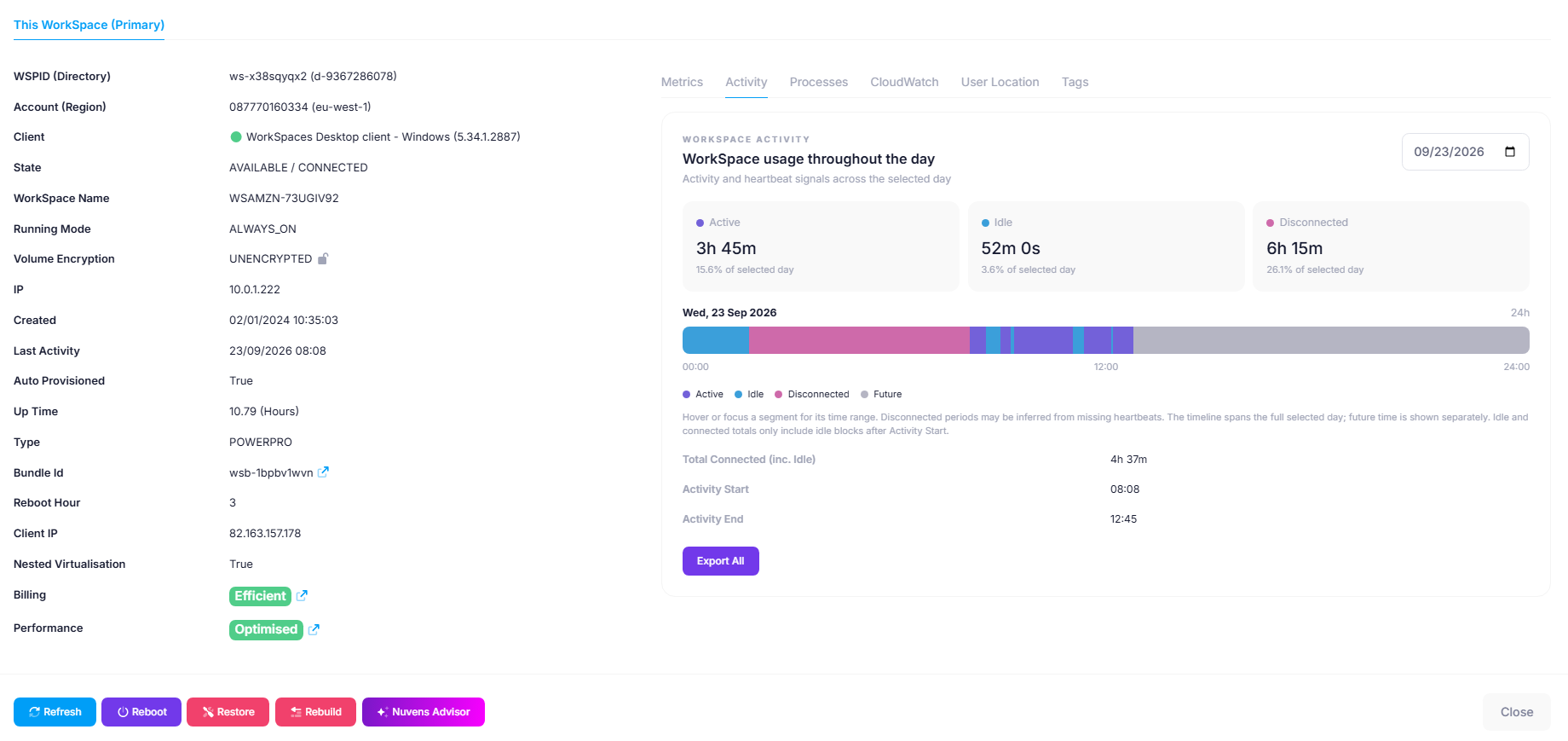
From report to resolution in two clicksSpot the issue, open the user’s WorkSpace and act.
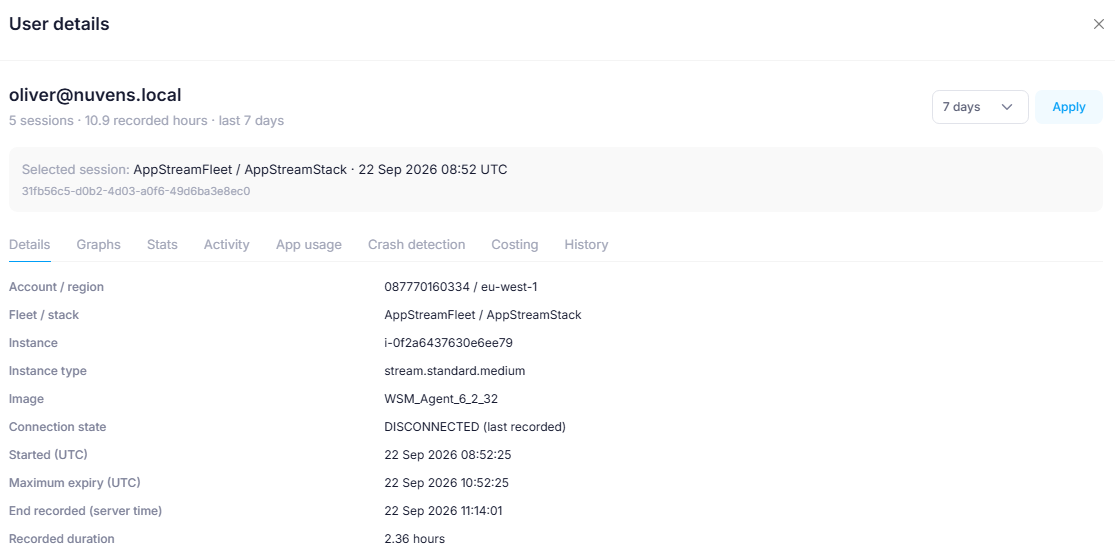
WorkSpaces Manager WorkSpace details with activity timeline, running mode, billing and support actionsActual WorkSpaces Manager · user activity and controls
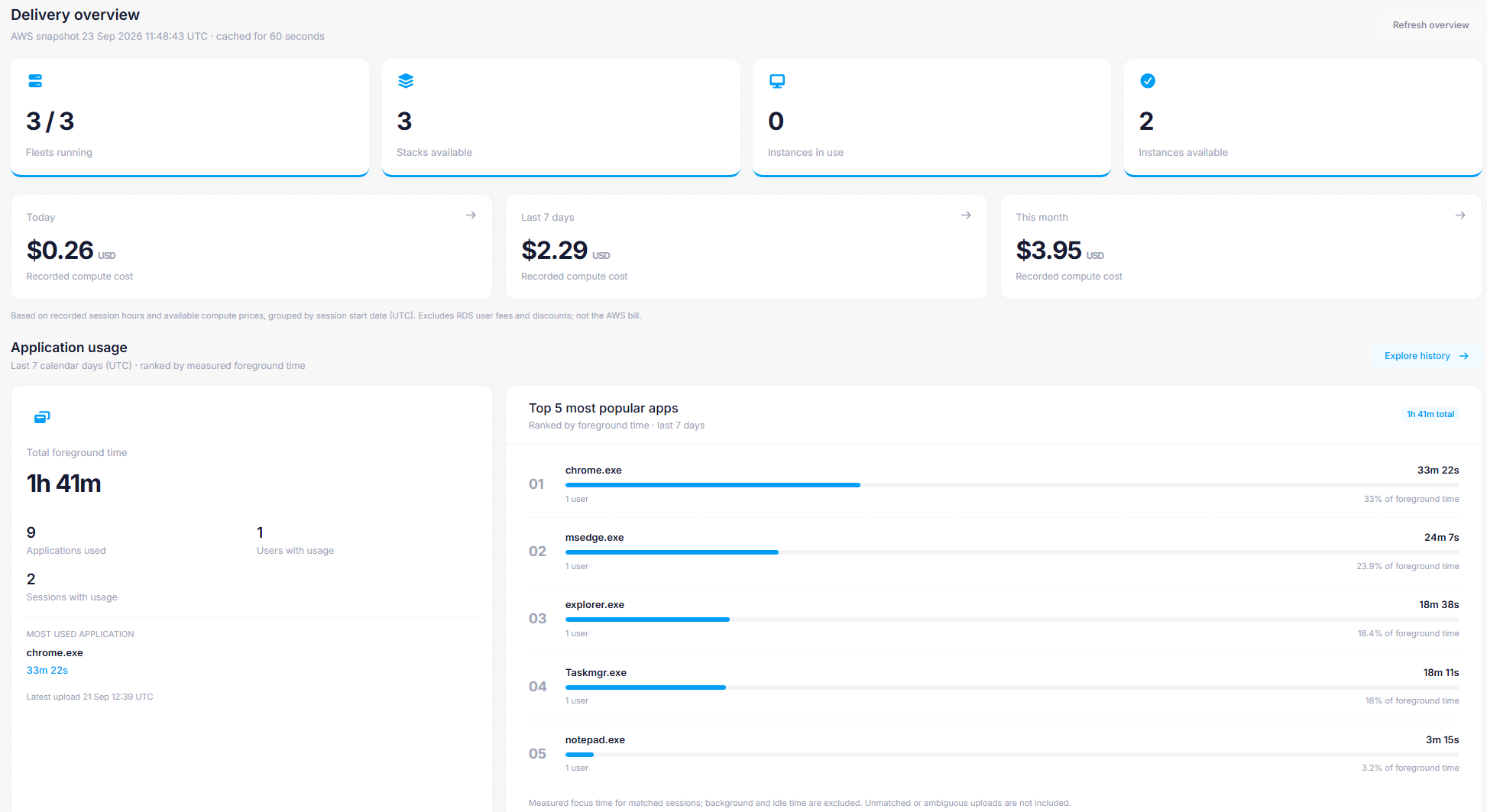
WorkSpaces Applications delivery overview with fleets, stacks, compute cost and application usageActual WorkSpaces Applications · delivery overview
02 / Applications too

Running WorkSpaces Applications? Manage it here too.

WorkSpaces Applications, formerly AppStream 2.0, gets the same operational view and support path as your desktops, including single and multi-session fleets.

See WorkSpaces Applications pricing ↗
Zero-touch onboarding

Add a user to a group.
They get a working desktop.

Replace the ticket, manual build, follow-up email and first-day support call with one automated, audited workflow for Entra ID only and hybrid joined AD environments.

No ticketsNo manual buildsNo “is it ready?” callsAn audit trail for every joiner
01
TRIGGER

HR adds the user to a group

Link an Auto Provisioning profile to an Entra ID or AD group. From then on, joining the group is the only step.

02
BUILD

WorkSpace created automatically

AWS builds the WorkSpace from the right profile, and WSM tracks it and its owner from the first minute.

03
WELCOME EMAIL

User signs in

The user gets clear sign-in instructions by email, with no service desk call needed.

04
ENROL

Device enrolled

Entra ID only: Autopilot enrols the WorkSpace in Entra ID and Intune. Hybrid: it follows your existing AD join and device management.

05
CONFIGURE

Your baseline applied

Your policies install the required applications, updates, security tools and settings.

06
VERIFY

Readiness proven

WSM checks AWS, Microsoft and agent signals against your readiness rules. Nothing is marked ready until it is.

07
READY EMAIL

User starts work

When every check passes, the user is told their WorkSpace is ready.

WorkSpaces Manager / Monitor + orchestrate

Every joiner tracked. Every failure caught.

See onboarding in progress, get alerted when a check fails and retain an audit record of the result.

◉ Track✓ Verify! Alert↻ Remediate≡ Audit

If a check fails

Hold the ready email, flag the failed check and alert the team. Retry or remediate where configured.

When every check passes

The user is told their secure, configured WorkSpace is ready to use.

Pricing

30-day Free Trial
Find the savings first.

Start with a 30-day free trial and see what you could save before you pay. 

Every plan includes a 30-day free trial · 24×7 support · AWS Marketplace billing
ENTRA-ONLY JOIN

Entra Only Module

$1.00 / month
per WorkSpace

Entra Only Join WorkSpaces Module with Intune and creation monitoring.

Ask about Entra Only ↗
PUBLIC SECTOR

Government

On request
per WorkSpace per month

Buy through AWS Marketplace, with standard installation, 24×7 support and options for public sector security requirements.

Get a quote ↗
APPLICATIONS · PRICE TO CONFIRM

WorkSpaces Applications

$0.75 / month*
per user

Management of WorkSpaces Applications, including Dynamic Apps, with standard installation and 24×7 support.

Start free trial ↗

Need something bespoke? We build custom features and integrations for enterprise environments. Talk to us ↗

Trusted by

Chosen by organisations to drive down administration time.

London Stock Exchange
Lazard
Lamb Weston
Intuit
Holcim
Fast Retailing
Customer story

A global training estate, built to scale securely.

Case study / Financial software

Secure training desktops for worldwide teams.

ChallengeA secure training environment designed for a brief of up to 120,000 end users.
SolutionZero-trust infrastructure with Windows 11, Intune and Slack integration.
ResultAn operational global training system that exceeded the original expectations.
Read the full case study ↗Download PDF ↗
Customer story

Fewer idle WorkSpaces. Six figures saved monthly.

Case study / Global consulting

Making a large estate more efficient and easier to run.

ChallengeMore than 10,000 users and limited visibility into desktop utilisation.
SolutionUsage insights and right-sizing to match capacity to actual demand.
Result12,000 WorkSpaces reduced to under 10,000, with six-figure monthly savings.
Read the full case study ↗Download PDF ↗
Free WorkSpaces estate review

Find out how we can optimize your Amazon EUC Estate.

In 30 minutes, see where unused and oversized WorkSpaces tend to hide, what can be automated and where a trial could show savings.

See how WorkSpaces Manager brings cost, support and automation into one console. 1 min 31 sec · Sound optional

Book your free estate review

Google reCaptcha: Invalid site key.

We’ll use your details to respond to your enquiry. Read our Privacy Policy.
×